Concept to Completion: My AI Video Workflow
My goal with AI video isn’t just to make something look “AI-generated.” It’s about leveraging these powerful tools to create compelling visual stories that resonate. Here’s how I make it happen:
Step 1: The Genesis – Ideation and Visual Blueprinting with Stable Matrix
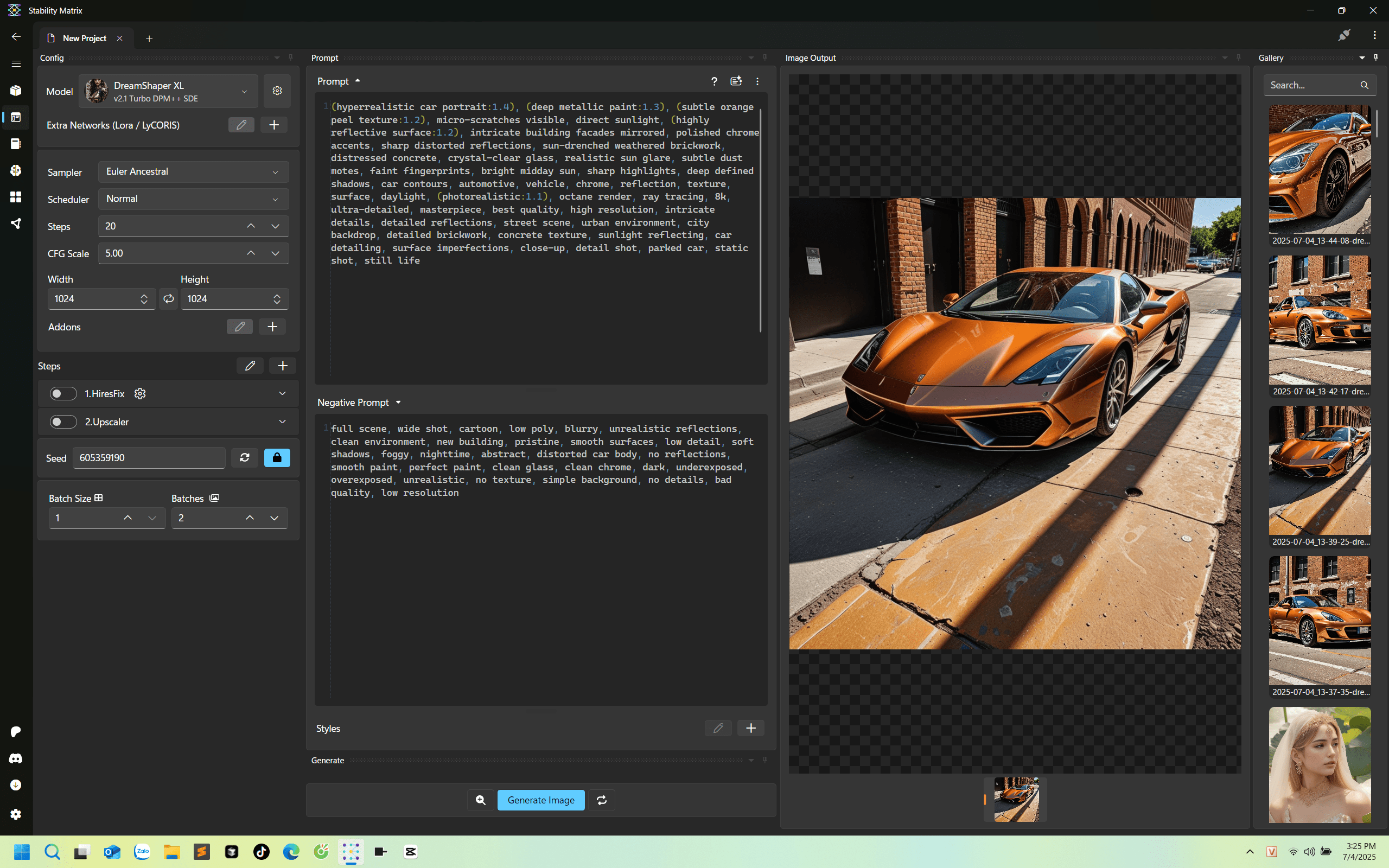
Every great video starts with a clear vision. For me, that often means cars – sleek, dynamic, and full of potential. This is where Stable Matrix comes into play. It’s my go-to for rapidly prototyping and visualizing car models.
I start by feeding Stable Matrix a blend of text prompts and visual references. Think about the car’s aesthetic, its environment, the mood. I don’t just input “red sports car.” Instead, it’s more like: “futuristic electric sports car, sleek aerodynamic lines, obsidian finish, glowing blue accents, parked on a dystopian cityscape rooftop at dusk, subtle volumetric lighting.”
Then comes the iterative process. I generate multiple models, tweak the prompts, and refine until I get that “aha!” moment. I’m looking for models that not only look incredible but also tell a story, even in a static form. The key here is to embrace the experimental nature; you’re sculpting with words and data, not clay.
Step 2: Breathing Life into Stills with Kling AI
Once I have my hero car model from Stable Matrix, it’s time to make it move. This is where Kling AI shines as my text-to-image-to-video powerhouse. I take those high-fidelity car renders and feed them into Kling AI, accompanied by a new set of prompts.
This stage is all about animation prompts and it’s heavily reliant on trial and error. My initial prompts might be simple, like “car driving down a futuristic highway.” But I quickly iterate, adding details for camera movement, environmental interactions, and emotional tone. For instance, “dynamic low-angle shot, cybernetic sports car accelerating through neon-lit tunnel, subtle lens flare, sense of speed and exhilaration.”
It’s a dance between precise instruction and creative exploration. I’m making countless small adjustments, observing the subtle shifts in animation, and refining my prompts until the car moves exactly as I envision—smoothly, purposefully, and with character.
Step 3: Elevating Dynamics with Higgsfield AI for Camera Work
A static camera can kill even the best animation. That’s why, after getting the core animation locked down in Kling AI, I move to Higgsfield AI to inject dynamic camera movements and effects.
Higgsfield AI allows me to add that cinematic flair. I can simulate dollies, trucks, pans, tilts, and even more complex orbital movements around the car. This transforms a simple animation into a much more engaging visual experience. For example, I might take a Kling AI clip of the car driving and use Higgsfield to add a dramatic push-in shot, followed by a sweeping crane shot to reveal the vastness of the environment. It’s about bringing a director’s eye to the AI-generated footage.
Step 4: The Finishing Touch – Composing and Enhancing in Post-Production
The raw AI-generated clips are just the ingredients. The magic happens in post-production, where I bring everything together using a combination of CapCut, Topaz AI Video, and Adobe Premiere Pro.
First, CapCut is fantastic for quick cuts, initial sequencing, and basic trimming of all the short clips I’ve generated. It helps me lay down the story’s rhythm.
Next, Topaz AI Video is an absolute game-changer for enhancing video quality. AI-generated footage, while incredible, can sometimes benefit from sharpening, de-noising, and upscaling, especially if I want to push it to a higher resolution for a client. Topaz makes those subtle imperfections disappear, giving the video a much more polished and professional look.
Finally, Adobe Premiere Pro is where the real finessing occurs. Here, I handle:
- Advanced Color Grading: Establishing the mood and visual style.
- Refined Pacing and Transitions: Ensuring a seamless flow between scenes.
- Sound Design & Music: This is crucial for emotional impact. I meticulously select sound effects for engine roars, tire screeches, ambient city sounds, and pair them with a perfectly timed music track that amplifies the visual narrative. The right audio can elevate an AI-generated video from cool to captivating.
The Road Ahead: My Take on AI in Video Production
This process isn’t just about using fancy tools; it’s about blending creative intuition with cutting-edge technology. It’s about pushing the boundaries of what’s possible, even if it means countless iterations and “failed” prompts along the way. That’s where the learning happens, and that’s how we discover new visual languages.
AI video generation is rapidly evolving, and I’m excited to continue exploring its potential. It’s a powerful ally for any designer or producer looking to deliver impactful visual content in a dynamic market.
What’s your biggest challenge or excitement when thinking about AI in video production? I’d love to hear your thoughts in the comments below!